Hunt
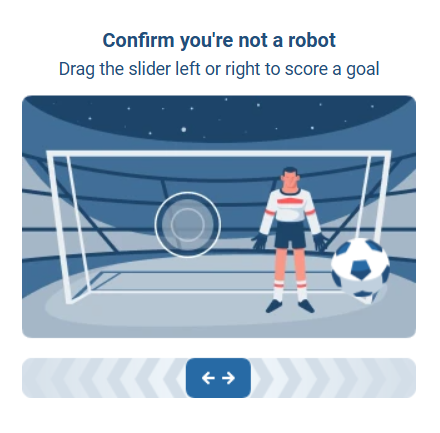
Hunt CAPTCHA is an anti-bot system used on betting platforms to detect automated activity. It monitors user behavior and, if suspicious actions are detected, triggers an interactive verification.
-
For this task, use your own proxies.
-
Our solving system has two operating modes: X-HD generation (fingerprint) and CAPTCHA solving. If you only want to generate X-HD, do not pass the
dataparameter. If you need to solve the CAPTCHA, pass the token that the target site provides during certain actions (for example, when requesting an SMS).
Request parameters
type<string>requiredCustomTask
class<string>requiredHUNT
websiteURL<string>requiredThe URL of the page where the Hunt CAPTCHA is located.
apiGetLib (inside metadata)<string>requiredThe full link to the api.js file.
Example:
https://www.example.com/hd-api/external/apps/<hash>/api.js
Pass it in the following format:
"apiGetLib":"https://example.com/hd-api/external/apps/a2157wab1045d68672a63557e0n2a77edbfd15ea/api.js"
You can find this link in DevTools (the Network or Elements tabs) on the page with the Hunt CAPTCHA.
Use keyword search such as: hd-api or api.js.
data<string>optionalThe data parameter must be specified when using CAPTCHA solving mode (see details below).
userAgent<string>optionalBrowser User-Agent.
Provide only the current Windows UA: userAgentPlaceholder
proxyType<string>requiredhttp - regular HTTP/HTTPS proxy;
https - use if http doesn’t work (required for some custom proxies);
socks4 - SOCKS4 proxy;
socks5 - SOCKS5 proxy.
proxyAddress<string>requiredProxy IP address (IPv4/IPv6). Not allowed:
- Transparent proxies
- Local machine proxies
proxyPort<integer>requiredProxy port.
proxyLogin<string>requiredProxy login.
proxyPassword<string>requiredProxy password.
The solution supports two operating modes:
-
X-HD (fingerprint) generation
- In this mode, you do not pass the
dataparameter. - After creating the task, you will receive an X-HD — a unique fingerprint tied to your IP address, which can be used for subsequent requests to the website.
- In this mode, you do not pass the
-
CAPTCHA solving
- In this mode, you must pass a token (the value of
meta.token) in thedataparameter. This token is issued by the website during specific actions (for example, when requesting an SMS). - After creating the task, you will receive the CAPTCHA solution as a token ready to be used on the website.
- In this mode, you must pass a token (the value of
When to use each mode:
| Situation | Is data required? |
|---|---|
| Initial initialization | No |
| Need to obtain X-HD | No |
| Website returned Captcha error | Yes |
meta.token received | Yes |
Example of a complete workflow:
- Create a task without
data - Receive X-HD from our service
- Send a request to the website using X-HD
- Receive
meta.token - Create a task with
data = meta.token - Receive the solution
- Submit the solution to the website
If you change the proxy, you must obtain a new X-HD.
Mode 1. X-HD Generation
Used to obtain an X-HD token bound to the IP address.
Create task method for X-HD generation
https://api.capmonster.cloud/createTask
Request
{
  "type": "CustomTask",
  "class": "HUNT",
  "websiteURL": "https://example.com",
  "metadata": {
    "apiGetLib": "https://example.com/hd-api/external/apps/a2157wab1045d68672a63557e0n2a77edbfd15ea/api.js"
  },
  "userAgent": "userAgentPlaceholder",
  "proxyType": "http",
  "proxyAddress": "8.8.8.8",
  "proxyPort": 8080,
  "proxyLogin": "proxyLoginHere",
  "proxyPassword": "proxyPasswordHere"
}
Response
{
  "errorId": 0,
  "taskId": 407533072
}
Mode 2. CAPTCHA solving
Used after the website returns a captcha error and provides meta.token.
How to obtain meta.token
- Send a request to the website (for example, an SMS request).
- Receive X-HD.
-f3f729be80407dcfa979c939fcfb300a.png)
-1-feced69f9da880f442fb82a0d025775d.png)
- The website responds with:
{
  "errors": [{"code": "113", "title": "Captcha error"}],
  "meta": {
    "token": "SITE_META_TOKEN"
  }
}
-cb52653b917e55094fa4dbc891cd1746.png)
Create task method for CAPTCHA solving
The value of meta.token must be passed in the data parameter.
https://api.capmonster.cloud/createTask
Request
{
  "type": "CustomTask",
  "class": "HUNT",
  "websiteUrl": "https://example.com",
  "metadata": {
    "apiGetLib": "https://example.com/hd-api/external/apps/a2157wab1045d68672a63557e0n2a77edbfd15ea/api.js"
  },
  "data": "kufyHK/s/jTNU...AfwIW", // META_TOKEN value
  "userAgent": "userAgentPlaceholder",
  "proxyType": "http",
  "proxyAddress": "8.8.8.8",
  "proxyPort": 8080,
  "proxyLogin": "proxyLoginHere",
  "proxyPassword": "proxyPasswordHere"
}
Response
{
  "errorId": 0,
  "taskId": 407533072
}
Get task result method
Use the getTaskResult method to obtain the X-HD fingerprint or the Hunt CAPTCHA solution.
The value of solution.token:
-
In X-HD generation mode — this is the X-HD token that must be used in requests to the target website.
-
In CAPTCHA solving mode —
solution.tokenis the solution token that must be sent back to the website to confirm the action.
https://api.capmonster.cloud/getTaskResult
Request
{
  "clientKey": "API_KEY",
  "taskId": 407533072
}
Response
{
  "errorId": 0,
  "status": "ready",
  "solution": {
    "data": {
      "token": "6IyDCCpDdSK...YGs1Wug/z/kLNSpjewI="
    }
  }
}
Hunt CAPTCHA solving example
Below is a Node.js example demonstrating how to create a Hunt CAPTCHA task in CapMonster Cloud, wait for the solution, and obtain the X-HD token. The code shows:
- How to create a HUNT task with the target website and proxy
- How to wait for the solution using the CapMonster API
- How to retrieve the result and extract the token for further use on the website
Important: Make sure to replace
API_KEY,proxyLogin,proxyPassword, and other parameters with your real values before running the script. We recommend storing all sensitive data in a.envfile.
Show code (Node.js)
const API_KEY = "YOUR_API_KEY"; // Replace with your CapMonster Cloud API key
const CREATE_TASK_URL = "https://api.capmonster.cloud/createTask";
const GET_RESULT_URL = "https://api.capmonster.cloud/getTaskResult";

const sleep = (ms) => new Promise((resolve) => setTimeout(resolve, ms));

async function createHuntTask({ data = null } = {}) {
  const payload = {
    clientKey: API_KEY,
    task: {
      type: "CustomTask",
      class: "HUNT",
      websiteURL: "https://example.com/",
      userAgent: "userAgentPlaceholder",
      metadata: {
        apiGetLib:
          "https://example.com/hd-api/external/apps/a2157wab1045d68672a63557e0n2a77edbfd15ea/api.js",
      },
      proxyType: "http",
      proxyAddress: "123.45.67.89",
      proxyPort: 8080,
      proxyLogin: "proxyLogin",
      proxyPassword: "proxyPassword",
    },
  };

  if (data) {
    payload.task.data = data;
  }

  const response = await fetch(CREATE_TASK_URL, {
    method: "POST",
    headers: { "Content-Type": "application/json" },
    body: JSON.stringify(payload),
  });

  const result = await response.json();
  return result.taskId;
}

async function waitForResult(taskId) {
  while (true) {
    await sleep(3000);

    const response = await fetch(GET_RESULT_URL, {
      method: "POST",
      headers: { "Content-Type": "application/json" },
      body: JSON.stringify({
        clientKey: API_KEY,
        taskId: taskId,
      }),
    });

    const result = await response.json();

    if (result.errorId !== 0) {
      throw new Error(result.errorDescription);
    }

    if (result.status === "processing") {
      console.log("Task processing...");
      continue;
    }

    if (result.status === "ready") {
      console.log("RESPONSE:\n", JSON.stringify(result, null, 2));
      return result.solution;
    }
  }
}

async function main() {
  try {
    console.log("Creating HUNT task (X-HD mode)...");

    const taskId = await createHuntTask();
    console.log("Task ID:", taskId);

    const xhdToken = await waitForResult(taskId);
    console.log("X-HD received:\n", xhdToken);

    // ===== 2. CAPTCHA solving, if needed =====
    // const siteMetaToken = "SITE_META_TOKEN";
    // const solveTaskId = await createHuntTask({ data: siteMetaToken });
    // const finalSolution = await waitForResult(solveTaskId);
    // console.log("Final captcha solution:\n", finalSolution);
  } catch (error) {
    console.error("Error:", error.message);
  }
}

main();